- 9月 16 週三 201509:39
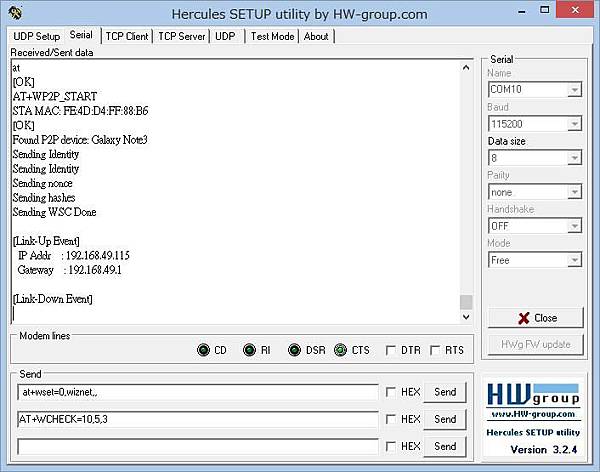
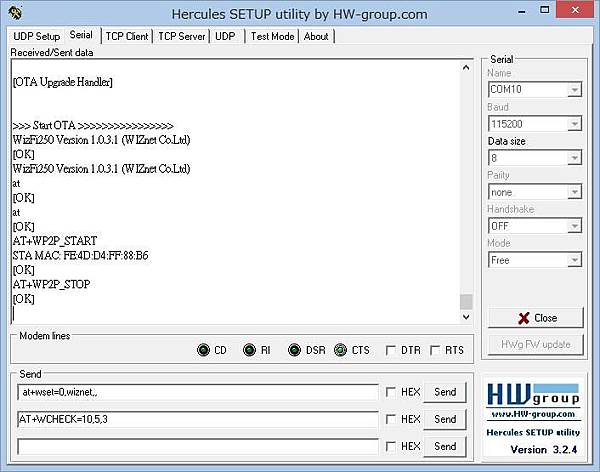
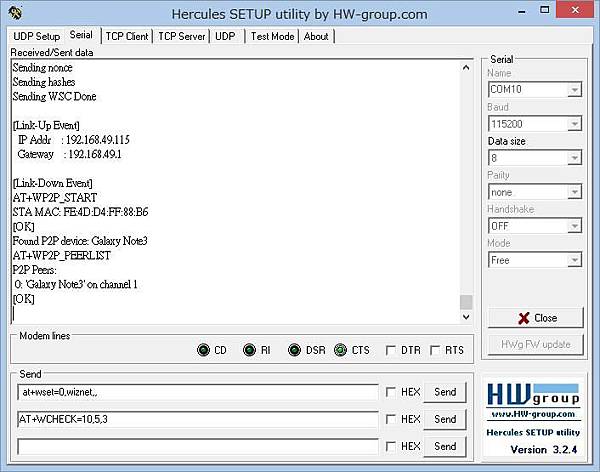
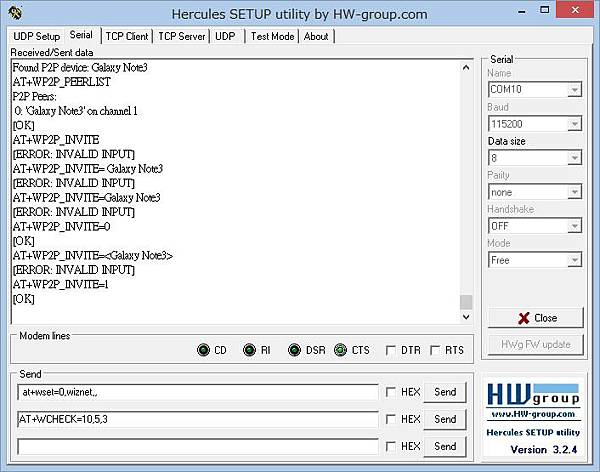
How to use Wi-Fi Direct in WizFi250
- 7月 28 週二 201509:39
Serial Communication in WIZ107SR
Serial Communication in WIZ107SR
Data mode to Command mode???
For entering into serial communication in WIZ107SR, you must using the follows step to do it.
1. Please using our config tool to set up your WIZ107SR to enable debug message out and Serial command mode switch code.
2b,2b,2b means "+++"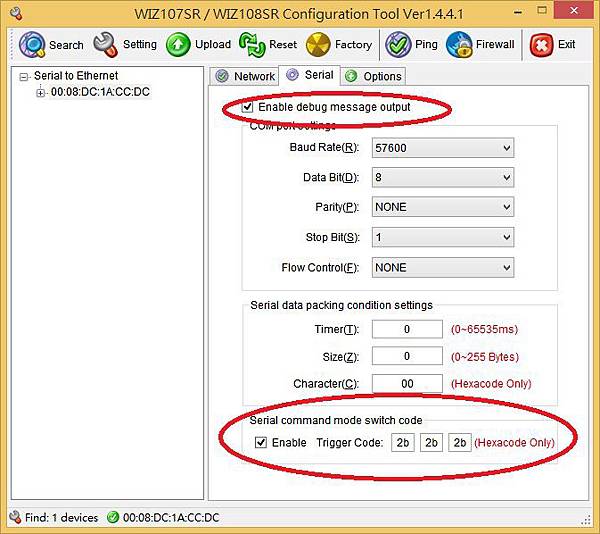
2. Then, you can open your serial tool and Type "+++" to change the mode from data mode to command mode.
PS: WIZ107SR default setting is data mode.
3. After that you may try to input some command in WIZ107SR
such MC$0A$0D, LI$0A$0D, LI192.168.11.3$0A$0D

$0A$0D = /r/n = Enter key
For detail please refer to WIZ107SR Document,
http://www.wiznet.co.kr/wp-content/uploads/wiznethome/S2E%20Module/WIZ107_108SR/Document/WIZ107SR_UM_V171E.pdf
3. Serial Configuration
3.1 Serial Command Format
$0A$0D = /r/n = Enter key
For detail please refer to WIZ107SR Document,
http://www.wiznet.co.kr/wp-content/uploads/wiznethome/S2E%20Module/WIZ107_108SR/Document/WIZ107SR_UM_V171E.pdf
3. Serial Configuration
3.1 Serial Command Format
- 5月 14 週四 201516:21
Arduino Ethernet Shield 2

Overview
The Arduino Ethernet Shield 2 connects your Arduino to the internet in mere minutes. Just plug this module onto your Arduino Board, connect it to your network with an RJ45 cable (not included) and follow a few simple steps to start controlling your world through the internet. As always with Arduino, every element of the platform – hardware, software and documentation – is freely available and open-source. This means you can learn exactly how it's made and use its design as the starting point for your own circuits. Hundreds of thousands of Arduino Boards are already fueling people’s creativity all over the world, everyday. Join us now, Arduino is you!
- Requires an Arduino Board (not included)
- Operating voltage 5V (supplied from the Arduino Board)
- Ethernet Controller: W5500 with internal 32K buffer
- Connection speed: 10/100Mb
- Connection with Arduino on SPI port
http://www.arduino.org/products/arduino-ethernet-shield-2
- 5月 11 週一 201514:27
如何使用無線模塊WizFi210的HTTP功能?
 點擊了解:無線模塊WizFi210
1、HTTP和HTTPS簡介
1.1 HTTP簡介
HTTP 即超文本傳輸協議(Hyper Text Transfer Protocol),客戶端(User Agent)通過WEB瀏覽器或網絡爬蟲等工具向服務器(網站)上指定端口(默認為80)以URL(統一資源定位符,即網址)的形式發起一個 HTTP 請求(一般為GET、POST),服務器監聽到這一請求後會回復一個狀態行+響應消息的主體,從而形成了一個完整的HTTP“請求—響應”過程,而這一過程是建立在TCP連接之上的數據透明傳輸過程。
- 5月 11 週一 201514:19
跟W5500學習SMTP協議

- 4月 16 週四 201516:52
WIZnet's Youtube Channel(Keeping Update)
- 4月 16 週四 201516:49
Arduino WiFi remote control car – WiFi arduiCar
Introduce
– Developed Arduino based RC Car using WizFi sheild.
– Used AT command for configuration and data communication.
– Provide various types of controller(Android APP mode, Web Server mode, Web browser mode)

- 4月 16 週四 201516:46
WizFi210應用筆記–如何復位?
WizFi210應用筆記–如何復位?
Wizfi210是WIZnet一款經典的“串口轉Wifi“透明傳輸的設備服務器模塊。
WizFi210為用戶提供了超低功耗無線片上系統和串口轉WIFI的嵌入式軟件來評價它的無線網絡能力。今天給大家介紹一下Wizfi210是怎樣復位的?
EXT_RESET引腳是雙向的。
EXT_RESET引腳在上電後是輸出,且在32KHz晶振正在穩定時被保持。一旦晶振穩定了,RESET被撤銷且成為一個輸入信號。同樣,上電時,WizFi210不需要復位,因為WizFi210已經內置了上電複位功能。所以MCU不需要assert除非有真的事件發生(如,懸空)。
注意: 復位的最小脈衝寬度是2個32KHz時鐘週期。

EXT_RESET信號是低電平有效信號(當信號處於低電平時,就是有效狀態)。
EXT_RESET在上電過程中是輸出,在設備離開上電複位狀態使指示系統。在上電複位後,該引腳是一個輸入信號。沒有必要在上電後按下復位鍵以復位WizFi210,因為WizFi210內置了上電複位功能。
並且,EXT_RESET信號不清除RTC RAM或SRAM。
但是,如果用EXT_RESET復位WizFi210,確認沒有進行<Led Blink during boot> 。
- 4月 16 週四 201516:45
ElecFreaks 推出精緻Wifi 插板EiFi–嵌入WizFi210無線模塊
ElecFreaks 推出精緻Wifi 插板EiFi–嵌入WizFi210無線模塊

瞧!多麼精緻的Wifi插板~
這是ElecFreaks 推出精緻Wifi 插板EiFi,帶有WIZnet WizFi210無線模塊^^
Freadiono Wifi插板–EiFi利用一個WizFi210無線模塊,給您的Arduino/Freaduino提供串口轉以太網功能。它提供從TTL串行端口通信到IEEE802.11 b/g/n無線通信的橋接。所以任意帶有TTL串行端口的設備都能非常容易的通過這個Wifi模塊實現無線連接,並通過無線網絡進行遠程控制和管理。該模塊已經集成了不同的通信協議和加密算法。其Arduino結構使你能非常容易的將之集成到任意基於Arduino的項目中。
推薦功能如下:
- 支持軟件/硬件串行端口與Arduino通信.
- WizFi210的SPI和IIC接口已經與Arduino連接
- 其AP功能(受限的)支持在沒有AP的情況下與iPhone,iPad和Android手機直連
- 工作在AP模式下(標準802.11b/g/n),速度高達11 Mbps(802.11b),另外還提供豐富的I/O接口(SPI,UART,GPIO,I2C,ADC,JTAG)
- 支持用戶端固件更新,用戶可以從WIZnet得到最新的固件
- 簡單的AT命令集用於配置和數據通信
- 低功耗模式,支持網絡喚醒


規格
- 無線芯片:WizFi210
- 無線協議:兼容IEEE802.11 b/g/n
- 支持的數據傳輸率:11,5.5,2,1Mbps(IEEE 802.11b)
- 調製:DSSS和CCK
- 射頻工作頻率:2.4-2.497 GHz
- 天線選擇:芯片天線和U.FL連接器(外部天線)
- 網絡協議:UDP, TCP/IP (IPv4), DHCP, ARP, DNS, HTTP/HTTPS Client and Server(*)
- 功耗:待機= 34.0 μA,接收=125.0 mA, 傳輸=135.0 mA
- RF 輸出功率:8dBm ± 1dBm
- 安全協議:WEP, WPA/WPA2–PSK, Enterprise, EAP-FAST, EAP-TLS, EAP-TTLS, PEAP
- I/O接口:UART, SPI(*), I 2 C(*), WAKE, ALARM, GPIOs
- 系統工作電壓:3.3V
- 大小(天線除外):59*50 mm

- 4月 16 週四 201516:43
WizFi210/WizFi220低功耗“串口轉WiFi”無線模塊–介紹及應用參考
WizFi210/WizFi220低功耗“串口轉WiFi”無線模塊–介紹及應用參考

幾大特點:
- 支持通過串行主機接口(Uart 或者SPI )實現 Wi-Fi連接
- 快速啟動時間 :低於20m秒
- 超低功耗 ,通過動態電源管理(待機:34.0μA;接收:124mA;輸出:126mA)
- 兼容標準IEEE 802.11b/g/n無線網卡,通訊速率高達11Mbps
- 支持WEP,WPA/WPA2-PSK, Enterprise,EAP-FAST,EAP-TLS,EAP-TTLS,PEAP加密協議
- 工作模式:客戶端,點對點(AD-HOC),有限的AP(可直接從電腦,智能手機等,連接到Wi-Fi)
- 工作溫度: -40 ° C to 85 ° C ( 工業級標準)
- 體積小巧: 32 × 23.5 × 2.9 (mm)
- 具備CE, FCC以及KCC , TELEC認證
- WizFi220:RF增強的功率放大器可以改善無線網絡範圍

應用參考:
- 有限的AP模式- 智能插件

智能插件是一個自動化的能源管理系統,它可以確認和攔截電源。WizFi210會工作為有限AP模式,通過UART給智能插件提供一個無線網絡平台.因此智能電話可以直接通過無線網絡連接到智能插件,而不需要通過另外一個AP。
從智能手機的電源管理應用程序直接連接到無線網絡
-開/關智能插件
-測量功耗
-調度的電源使用
- 客戶端模式 - 數位轉速表

WizFi210為車輛系統智能卡中的數位轉速表提供“串口轉無線”的連接。此時,WizFi210作為一個客戶端通過Wi-Fi與一個AP建立鏈接
- 企業安全(Enterprise Security)模式- 遠程驗證撥號使用者服務(RADIUS)服務器的認證流程

感謝關注!
