Serial Communication in WIZ107SR
Data mode to Command mode???
For entering into serial communication in WIZ107SR, you must using the follows step to do it.
1. Please using our config tool to set up your WIZ107SR to enable debug message out and Serial command mode switch code.
2b,2b,2b means "+++"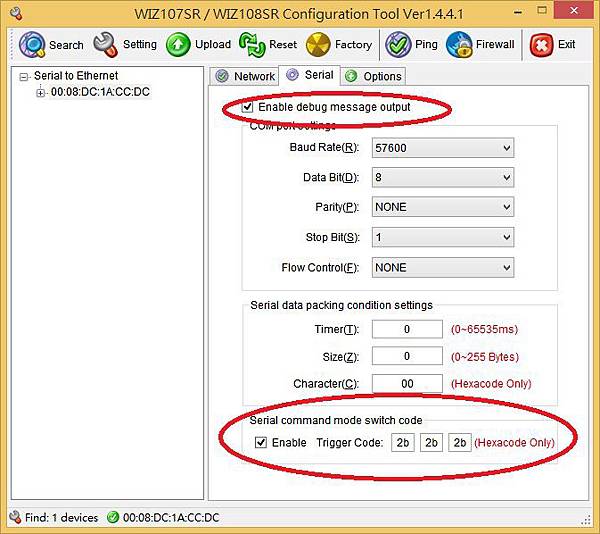
2. Then, you can open your serial tool and Type "+++" to change the mode from data mode to command mode.
PS: WIZ107SR default setting is data mode.
3. After that you may try to input some command in WIZ107SR
such MC0A0D, LI0A0D, LI192.168.11.30A0D

0A0D = /r/n = Enter key
For detail please refer to WIZ107SR Document,
http://www.wiznet.co.kr/wp-content/uploads/wiznethome/S2E%20Module/WIZ107_108SR/Document/WIZ107SR_UM_V171E.pdf
3. Serial Configuration
3.1 Serial Command Format
0A0D = /r/n = Enter key
For detail please refer to WIZ107SR Document,
http://www.wiznet.co.kr/wp-content/uploads/wiznethome/S2E%20Module/WIZ107_108SR/Document/WIZ107SR_UM_V171E.pdf
3. Serial Configuration
3.1 Serial Command Format
文章標籤
全站熱搜
